




Princess Farmer (PC) Steam Download
Runs on Windows
 Runs on Windows
Runs on MAC
Runs on Linux
Steam Deck compatibility
Compatibility details are loading.
Reported by Steam. Cached for up to 24 hours.
Play on XBOX 360
Play on Wii U
Play on XBOX ONE
Play on Series X|S
Play on PS3
Play on PS4
HTC Vive Support
Oculus Rift Support
Windows Mixed Reality Support
Steam Deck compatibility
Compatibility details are loading.
Reported by Steam. Cached for up to 24 hours.
Released
Developed by
Published by Whitethorn Games
Runs on Windows  Single Player
 Multi-Player
 Co-Op
Local Co-Op
 Controller Support
 Achievements
 Cloud Saves
 Puzzle
 Retro
 Download
 Video games that show violence of a slightly more graphic nature towards fantasy characters or non-realistic violence towards human-like characters would fall in this age category. Sexual innuendo or sexual posturing can be present, while any bad language in this category must be mild. Gambling as it is normally carried out in real life in casinos or gambling halls can also be present (e.g. card games that in real life would be played for money).
gamers playing right now

£11.39
Save 81%
Our Price: £2.151 left!

- Description
- Track Listing
- Media
- Reviews
- Trading Cards
- Achievements
- Languages
- System Requirements
- How Do I Download?
Princess Farmer is a match3 puzzle and visual novel game with easy to learn action mechanics and different playstyles that let you breeze through the game or challenge you. All three of the playstyles earn you rewards! The story is played in episodes, much like magical-girl anime, with each lasting between 20 minutes to 1 hour, depending on your chosen playstyle, your skills, and whether you decide to skip dialogue interactions. Different level goals keep you on your toes and bring a fresh approach to the match3 genre. Dialogue options let you choose how Princess Farmer interacts with her friends, affecting your relationships with them. Make them your BFF and they may reward you with gifts!
Princess Farmer was just an ordinary farmer when one day she woke up under the Gaia Tree. Now through the magic of Mother Gaia, she can hoist up whole rows of veggies with ease to make matches and smash obstacles by herself, in co-op, or even with an AI companion! Something mysterious is happening in the woods and it's your job to puzzle your way to uncover it! You'll learn about the world around you as you talk and build relationships with the loveable characters including: Mother Gaia, Garlic, Shoppe Keeper Rowan, and even BunBot!
Make combos! Smash rocks! Win hearts!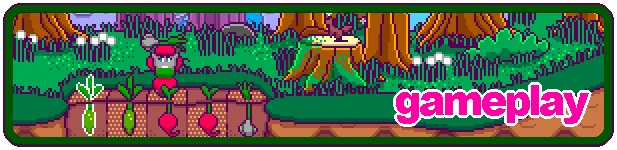
Action Puzzle Gameplay
It may look like Princess Farmer plays like modern match-3 games but it’s much more strategic and reaction-based, tasking you with character movement and stack management. You can choose to adjust how you approach your strategy to maximize matches, combos, and smashes. Personalize your playstyle: are you an Action Bunny, a Puzzle Bunny, or a Balance between the two? Level goals range from simple (like score, timed, harvest a certain veggie) to challenging (like fulfilling requests, avoiding matching certain veggies, danger areas). Some levels will pit you up against a (pretty adorable) opponent. But watch out for storms! That's when Grumpy Block shows up to spoil all your harvesting fun!
Play with a Friend
Sure harvesting is fun by yourself, but why not invite a friend? You can harvest together and even make dialogue choices together as you explore the world. With Steam's Remote Play Together, you don't even have to be in the same house!
Collect Unlockables
As you play, you'll earn Heart Coins which you can give to Ro at the Shoppe to collect different Hare Dyes. Charm the characters with dialogue options to unlock new outfits so you can harvest in style!
Charming Graphics
It's cute! It's bouncy! It's pink! It's retro! It's BUNNIES!
Vibrant Soundtrack
Produced by Astra, the soundtrack is bubbly, blending chiptunes with lo-fi beats. Additional music is by Chloe Hotline, The Crystal Furs, and Anne Beyond the Darkness.
About Samobee Games
We’re a wife/wife team building games in the chilly North of British Columbia in Canada. We love all things cute and girly!
About Whitethorn Games
We’re an indie game publisher focusing on pleasant, cozy games that can be played in pieces, that require no special skills or knowledge, and that anyone can pick up and play. We’re believers in accessibility, inclusion, and widening the audience that gets to play. We like to consider ourselves the defenders of easy games.
Loading player reviews…
| Name | Image |
|---|
This product currently supports the following languages:
Windows

Steam key activation & download guide
Follow these steps if you purchased a Steam Key. Steam Gifts use the separate gift-redemption instructions.
Get Steam ready
You will need the Steam desktop client installed on your computer. If it is already installed, simply open it. Otherwise, install Steam before continuing with the activation steps below.
Sign in to your Steam account
Open Steam and sign in, or create an account if you do not have one. Check that you are using the account on which you want to activate your purchase.
Open product activation
In the Steam client, choose + Add a Game at the bottom-left, then Activate a Product on Steam. Follow the on-screen prompts.
Enter your Steam key
Copy the product key supplied with your purchase into the activation field and continue through the confirmation. Use the product key, not your order number.
Download and play
Open your Steam Library, select the activated game and choose Install. Follow the download and installation prompts, then launch the game from your Library.
Having trouble activating your key? Check that you copied the full product key and entered it in Activate a Product on Steam, not the wallet-code field. If you still need help, contact our support team with your order number and the error message shown. Keep your product key private.
· Publisher: Whitethorn Games
