




Super Sportmatchen (PC) Steam Download
Runs on Windows
 Runs on Windows
Runs on MAC
Runs on Linux
Steam Deck compatibility
Compatibility details are loading.
Reported by Steam. Cached for up to 24 hours.
Play on XBOX 360
Play on Wii U
Play on XBOX ONE
Play on Series X|S
Play on PS3
Play on PS4
HTC Vive Support
Oculus Rift Support
Windows Mixed Reality Support
Steam Deck compatibility
Compatibility details are loading.
Reported by Steam. Cached for up to 24 hours.
Released
Developed by
Published by DANGEN Entertainment
Runs on Windows  Single Player
 Multi-Player
 Co-Op
Local Co-Op
 Controller Support
 Achievements
 Action
 Family Friendly
 Sports
 Download
gamers playing right now

£12.79
Save 76%
Our Price: £2.99
- Description
- Track Listing
- Media
- Reviews
- Trading Cards
- Achievements
- Languages
- System Requirements
- How Do I Download?
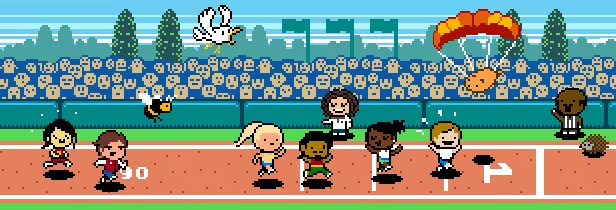
Enjoy a fine selection of sport disciplines, ranging from the frantic and fast paced to the relaxed and playful! Invite your friends, foes and family to a game of fun competitive sports!
Features:
-
A collection of ten highly varied and fantastical sports.
-
Team up in a 2 vs 2 tournament or let each sporter fend for themselves.
-
Upload your scores to the online leaderboards and gloat together with others around the world.
-
Set up your own tournaments by selecting the sports in the order that you want.
-
A host of cute animals are waiting to help you out, whether it is by fetching balls, being thrown or being fed delicious candy.
-
Tak Fujii is extreeeme!
Find out interesting facts about your fellow competitors, such as:
- Who has the fastest fingers and the steadiest hands?
- Who can withstand the pressure to perform under extreme stress?
- Who will flamboyantly brag when the victory is theirs?
- Who will reveal themselves as the sore losers that they truly are?
Was your sports career ruined by an unfortunate knee accident? Gloat in your own competitive awesomeness! Enjoy being the best at something! Feel the rush of excitement as you set a new world record! Imagine yourself at the top of the podium!
Remember that winning isn't everything, but winners have more fun!
Loading player reviews…
| Name | Image |
|---|
This product currently supports the following languages:
Windows

Steam key activation & download guide
Follow these steps if you purchased a Steam Key. Steam Gifts use the separate gift-redemption instructions.
Get Steam ready
You will need the Steam desktop client installed on your computer. If it is already installed, simply open it. Otherwise, install Steam before continuing with the activation steps below.
Sign in to your Steam account
Open Steam and sign in, or create an account if you do not have one. Check that you are using the account on which you want to activate your purchase.
Open product activation
In the Steam client, choose + Add a Game at the bottom-left, then Activate a Product on Steam. Follow the on-screen prompts.
Enter your Steam key
Copy the product key supplied with your purchase into the activation field and continue through the confirmation. Use the product key, not your order number.
Download and play
Open your Steam Library, select the activated game and choose Install. Follow the download and installation prompts, then launch the game from your Library.
Having trouble activating your key? Check that you copied the full product key and entered it in Activate a Product on Steam, not the wallet-code field. If you still need help, contact our support team with your order number and the error message shown. Keep your product key private.
· Publisher: DANGEN Entertainment