




Albert and Otto: The Adventure Begins (PC/MAC) Steam Download
Runs on Windows
 Runs on Windows
 Runs on MAC
Runs on Linux
Steam Deck compatibility
Compatibility details are loading.
Reported by Steam. Cached for up to 24 hours.
Play on XBOX 360
Play on Wii U
Play on XBOX ONE
Play on Series X|S
Play on PS3
Play on PS4
HTC Vive Support
Oculus Rift Support
Windows Mixed Reality Support
Steam Deck compatibility
Compatibility details are loading.
Reported by Steam. Cached for up to 24 hours.
Released
Developed by
Published by KBros Games
Runs on Windows
Runs on MAC  Single Player
 Controller Support
 Achievements
 Steam Trading Cards
 Cloud Saves
 Platformer
 Puzzle
 Download
gamers playing right now

£3.99
Save 50%
Our Price: £1.99
- Description
- Track Listing
- Media
- Reviews
- Trading Cards
- Achievements
- Languages
- System Requirements
- How Do I Download?

Clues as to who she is and what happened to her are scattered throughout the game in the form of drawings left in post boxes and shards that the player must piece together.
However the player is not alone on this adventure, help comes in the form of the girl’s magical bunny, Otto.
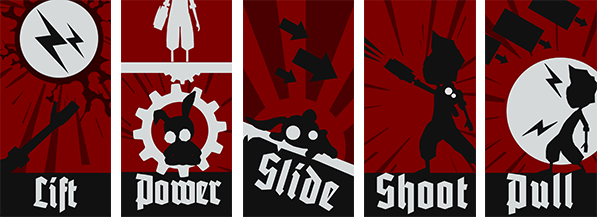
The player must use both Albert and Otto in creative ways to traverse a haunting world. At the beginning of the story, Albert can shoot and jump, while Otto can fit through tight gaps and hold down power switches. But together, they unlock new skills such as a double jump, levitation, control of electrical currents, and more as the story unfolds.
Features
- Unique mechanic utilizing a little bunny which the player can carry around or leave and/or remotely control in order to solve puzzles
- A story that is inspired by dark events buried in our history and isn't spoon fed to the player but spans across 3 episodes and is told through a child's drawings and clues scattered throughout the game that force the player to think outside the box.
- Levitate sheep, use them as platforms to swim on, a torch to light a dark cave or as a distraction for wolves while you make a quick escape. (if your stomach can handle it)
- 2.5 - 3 hours of unique puzzles that utilize a bunny, levitation, electrical switches, wolves, piranhas and more.
- Experience a mix of slow paced thought provoking puzzle design and fast unforgiving gauntlet sections.
- Come face to face with intimidating larger than life mechanical monsters and outsmart them.
Reviews
“Combining a compelling plot and setting with what I consider to be a fantastic art style, Albert & Otto is promising to be one of my most anticipated titles so far this year”
IndieGames
“This atmospheric 2D platformer about a little boy and his magical bunny takes some aesthetic cues from indie hit Limbo but offers its own clever spin on physics-based puzzles.”
Entertainment Weekly
“K Bros Games has finally awakened the [2D puzzle platform] genre from its dormant state with their first game, Albert & Otto. I would genuinely consider this to be a no-brainer purchase.”
Se7enSins
Loading player reviews…
| Name | Image |
|---|
This product currently supports the following languages:
Windows
Mac

Steam key activation & download guide
Follow these steps if you purchased a Steam Key. Steam Gifts use the separate gift-redemption instructions.
Get Steam ready
You will need the Steam desktop client installed on your computer. If it is already installed, simply open it. Otherwise, install Steam before continuing with the activation steps below.
Sign in to your Steam account
Open Steam and sign in, or create an account if you do not have one. Check that you are using the account on which you want to activate your purchase.
Open product activation
In the Steam client, choose + Add a Game at the bottom-left, then Activate a Product on Steam. Follow the on-screen prompts.
Enter your Steam key
Copy the product key supplied with your purchase into the activation field and continue through the confirmation. Use the product key, not your order number.
Download and play
Open your Steam Library, select the activated game and choose Install. Follow the download and installation prompts, then launch the game from your Library.
Having trouble activating your key? Check that you copied the full product key and entered it in Activate a Product on Steam, not the wallet-code field. If you still need help, contact our support team with your order number and the error message shown. Keep your product key private.
· Publisher: KBros Games