




Calibre 10 Racing Series (PC) Steam Download
Runs on Windows
 Runs on Windows
Runs on MAC
Runs on Linux
Steam Deck compatibility
Compatibility details are loading.
Reported by Steam. Cached for up to 24 hours.
Play on XBOX 360
Play on Wii U
Play on XBOX ONE
Play on Series X|S
Play on PS3
Play on PS4
HTC Vive Support
Oculus Rift Support
Windows Mixed Reality Support
Steam Deck compatibility
Compatibility details are loading.
Reported by Steam. Cached for up to 24 hours.
Released
Developed by
Published by Bongfish GmbH
Runs on Windows  Single Player
 Multi-Player
 Co-Op
 Controller Support
 Achievements
 Stats
 Steam Leaderboards
 Action
 Racing
 Shooter
 Download
gamers playing right now

£1.59
Save 37%
Our Price: £1.00
- Description
- Track Listing
- Media
- Reviews
- Trading Cards
- Achievements
- Languages
- System Requirements
- How Do I Download?
WHEEL TO WHEEL, PRECISION SHOOTING ACTION.
4 Teams of 2. One driver and one shooter. Each Team battling it out to be the first to cross the finish line.
Drivers go flat-out pushing horsepower limits behind the wheel of high-concept super cars in an all out blitz over tarmac and dirt. Shooters push firepower limits in high-tech military grade turrets, covering their driver, taking out opposing vehicles & turrets and jockeying for the most advantages turret positions around the track.
Team-work, intensity, vehicle countermeasures like flares and chaff to fend off incoming fire from opposing team turrets, a steady aim and on-track power-ups that provide an upgradeable edge for Shooter weaponry are needed to capture the checkered flag and championship glory.
Step in. Your next gen motorsports experience STARTS NOW.
Features
EXPERIENCE A GORGEOUS SETTING
The team at Bongfish is very proud of their proprietary game-engine allowing to draw detailed huge outdoor terrains.See some examples of Calibre 10 Racing Series first race track below.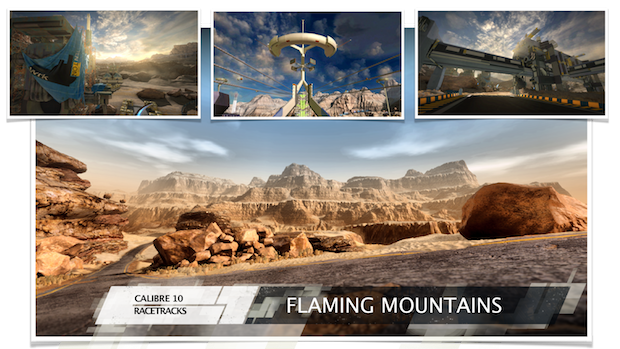
FEATURED ARTIST: SHANE BAXLEY
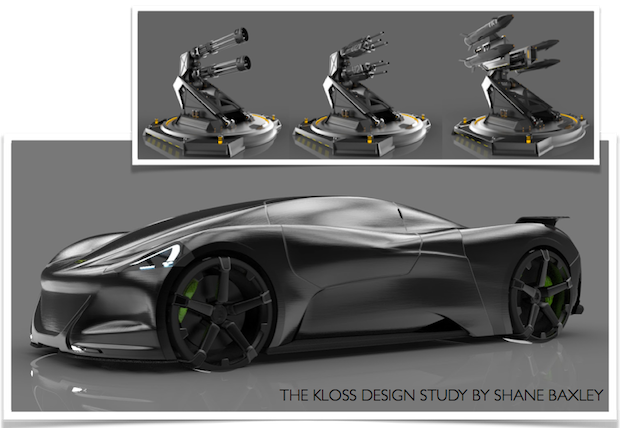
Shane's legendary Alienware MK2 concept car immediately turned us into fans of his works. You can imagine our excitement when Shane agreed on designing the very first vehicle and set of turrets. Now we are proud debuting the first ALPHA release with the KLOSS racing vehicle.More on Shane: http://www.breakingcustomdesign.com
Final Release Content
- Calibre Class Vehicles 1-10 - The full array of Calibre Class vehicles 1-10 will be unlockable in the final release with increased horsepower, handling and counter measures.
- Calibre Class Turrets 1-10 - Shooters will be able to man Calibre Class Turrets 1-10 in the final release with even more devastating firepower and ammo then the Alpha Release.
- Calibre Class Tracks 1-10 - The competition will heat up as Teams hit the starting grid on the full complement tracks from around the world on the C10 Racing Circuit.
- Class Progression System - Compete to become the best of the best and achieve the elusive yet elite Calibre 10 status, where the highest vehicles, weapons, tracks, perks and competition unfolds.
- Communication is Key - Only the teams with the highest of skill and communication will rise through the ranks on the C10 circuit.
System Requirements
- OS: Windows Vista
- Processor: Intel Dual-Core 2.4 GHz or AMD Dual-Core Athlon 2.5 GHz
- Memory: 4 GB RAM
- Graphics: NVIDIA GeForce 8800GT or AMD Radeon HD 3830
- DirectX: Version 9.0c
- Network: Broadband Internet connection
- Storage: 4 GB available space
- OS: Windows 7/Windows 8
- Processor: Intel Core i7, AMD Phenom II X4 or better
- Memory: 4 GB RAM
- Graphics: NVIDIA GeForce GTX 570, AMD Radeon HD 7750 with 1 GB VRAM or better
- DirectX: Version 9.0c
- Network: Broadband Internet connection
- Storage: 4 GB available space
Loading player reviews…
| Name | Image |
|---|
This product currently supports the following languages:
Windows

Steam key activation & download guide
Follow these steps if you purchased a Steam Key. Steam Gifts use the separate gift-redemption instructions.
Get Steam ready
You will need the Steam desktop client installed on your computer. If it is already installed, simply open it. Otherwise, install Steam before continuing with the activation steps below.
Sign in to your Steam account
Open Steam and sign in, or create an account if you do not have one. Check that you are using the account on which you want to activate your purchase.
Open product activation
In the Steam client, choose + Add a Game at the bottom-left, then Activate a Product on Steam. Follow the on-screen prompts.
Enter your Steam key
Copy the product key supplied with your purchase into the activation field and continue through the confirmation. Use the product key, not your order number.
Download and play
Open your Steam Library, select the activated game and choose Install. Follow the download and installation prompts, then launch the game from your Library.
Having trouble activating your key? Check that you copied the full product key and entered it in Activate a Product on Steam, not the wallet-code field. If you still need help, contact our support team with your order number and the error message shown. Keep your product key private.
· Publisher: Bongfish GmbH