




Townsmen - A Kingdom Rebuilt (PC) Steam Download
Runs on Windows
 Runs on Windows
Runs on MAC
Runs on Linux
Steam Deck compatibility
Compatibility details are loading.
Reported by Steam. Cached for up to 24 hours.
Play on XBOX 360
Play on Wii U
Play on XBOX ONE
Play on Series X|S
Play on PS3
Play on PS4
HTC Vive Support
Oculus Rift Support
Windows Mixed Reality Support
Steam Deck compatibility
Compatibility details are loading.
Reported by Steam. Cached for up to 24 hours.
Released
Developed by
Published by THQ Nordic Mobile
Runs on Windows  Single Player
 Controller Support
 Achievements
 Steam Trading Cards
 Cloud Saves
 Family Friendly
 Simulation
 Strategy
 Download
gamers playing right now

£17.49
Save 87%
Our Price: £2.191 left!

- Description
- Track Listing
- Media
- Reviews
- Trading Cards
- Achievements
- Languages
- System Requirements
- How Do I Download?

Welcome, your Highness! A vast land awaits your settlers and is ready to be colonized. Send your architects and builders to plan and construct a city. But also send your craftsmen, to cut some wood and to mine ore. Make sure your fields are on fertile grounds, to get all the food for your hungry subjects! Townsmen – A Kingdom Rebuilt hands the crown to you: Guide your people from their first steps in a small village to a massive medieval metropolis with thousands of inhabitants.
Overcome the challenges that lie ahead. Your citizens have various needs in order to stay happy. And you have to keep them happy, to keep the tax coins rolling which you need to build even more. Beware, as there are many things in the world that will disturb the happiness: Seasons will change the demand for certain goods – more water is needed during summer, more clothes in winter. Catastrophes may hit your prospering city, the plague, a large fire or an avalanche won’t make anyone happy nor will a bandit attack!
A huge variety of houses to build and many different jobs for your subjects will keep you busy. The armory will produce weapons for your soldiers, to keep your citizens save from bandits. The bakery or the butcher’s workshop will provide food, the monastery, the juice manufacture and the vineyard will bring the drinks – and everything can be bought at the marketplace! Make sure to have an eye on the daily routines of your people – besides jobs & food, they also need a place for recreation like a park, houses to live and entertainment in the jousting grounds or the tavern!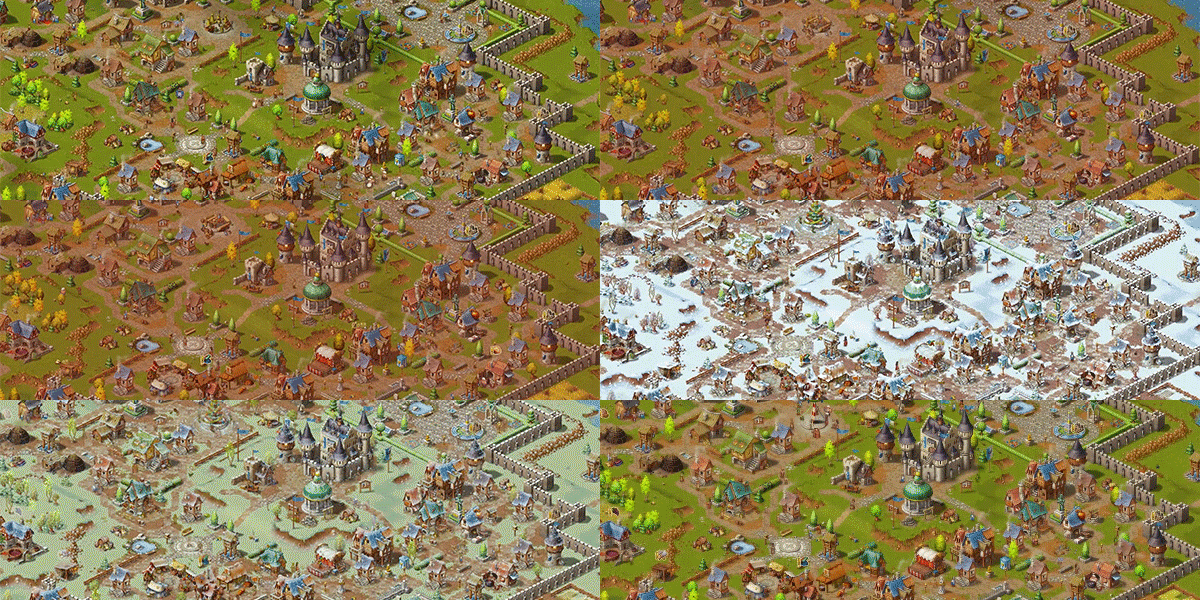
Each of your deeds is meaningful: If you order your folks to build a house, if you send them to a new job – everything will reward you with experience points. This progression system will allow you to research techniques that for example increase the amount of taxes you get or make your watchtowers more efficient. In every map you play!
FEATURES
-
- City-building gameplay set in medieval times
- Complex economy sim and deep production chains
- Over 150 different town- and production buildings
- Seasons and weather effects that influence gameplay
- Citizens have their own daily routines with different demands
- The overarching “town level” brings player progression for every single deed – you’ll be a better sovereign each time you play the game
- Devastating disasters like fire, the Plague, drought and many more
- 26 diverse scenarios and challenging tasks
- Unrestricted endless mode on 24 maps
- Optional military feature with soldiers and bandits
- New townie language for livelier interactions
- City-building gameplay set in medieval times
Loading player reviews…
| Name | Image |
|---|
This product currently supports the following languages:
Windows

Steam key activation & download guide
Follow these steps if you purchased a Steam Key. Steam Gifts use the separate gift-redemption instructions.
Get Steam ready
You will need the Steam desktop client installed on your computer. If it is already installed, simply open it. Otherwise, install Steam before continuing with the activation steps below.
Sign in to your Steam account
Open Steam and sign in, or create an account if you do not have one. Check that you are using the account on which you want to activate your purchase.
Open product activation
In the Steam client, choose + Add a Game at the bottom-left, then Activate a Product on Steam. Follow the on-screen prompts.
Enter your Steam key
Copy the product key supplied with your purchase into the activation field and continue through the confirmation. Use the product key, not your order number.
Download and play
Open your Steam Library, select the activated game and choose Install. Follow the download and installation prompts, then launch the game from your Library.
Having trouble activating your key? Check that you copied the full product key and entered it in Activate a Product on Steam, not the wallet-code field. If you still need help, contact our support team with your order number and the error message shown. Keep your product key private.
· Publisher: THQ Nordic Mobile
