




Crawl (PC/MAC/LINUX) Steam Download
Runs on Windows
 Runs on Windows
 Runs on MAC
 Runs on Linux
Steam Deck compatibility
Compatibility details are loading.
Reported by Steam. Cached for up to 24 hours.
Play on XBOX 360
Play on Wii U
Play on XBOX ONE
Play on Series X|S
Play on PS3
Play on PS4
HTC Vive Support
Oculus Rift Support
Windows Mixed Reality Support
Steam Deck compatibility
Compatibility details are loading.
Reported by Steam. Cached for up to 24 hours.
Released
Developed by
Published by Powerhoof
Runs on Windows
Runs on MAC
Runs on Linux  Single Player
 Multi-Player
 Controller Support
 Achievements
 Steam Trading Cards
 Cloud Saves
 Action
 Horror
 RPG
 Download
 This rating is applied once the depiction of violence (or sexual activity) reaches a stage that looks the same as would be expected in real life. The use of bad language in games with a PEGI 16 rating can be more extreme, while games of chance, and the use of tobacco, alcohol or illegal drugs can also be present.
gamers playing right now

£12.79
Save 37%
Our Price: £7.99
- Description
- Track Listing
- Media
- Reviews
- Trading Cards
- Achievements
- Languages
- System Requirements
- How Do I Download?

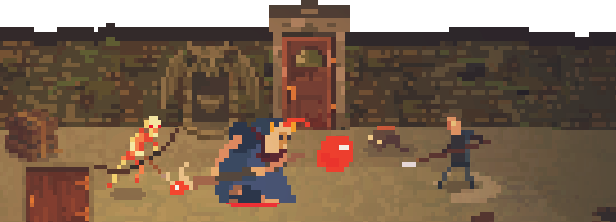
Crawl is the local multiplayer dungeon crawler where your friends control the monsters! It’s bullet-hell beat-em-up meets old-school RPG, in an arcadey party-game for up to 4 players.
One player is the hero, exploring a randomly generated dungeon full of traps and monsters - all controlled by the other players. If you slay the hero you take their place and it’s your turn to crawl! Then it's a race to gain enough XP and loot to reach the final battle, where it's all on one as the other players collectively control the hulking final boss!
Features
Local Multiplayer Arcade Action for 2-4 Players
- Play with Controllers, Keyboard or Mouse.
- Hone your skills against bots, while you wait for your friends to arrive.
Turbo Charged Dungeon Crawling
- Level up, increase your stats, amass powerful weapons and magic items, all in the course of one 30 minute game.
- Evolve your monsters from spiders and rats to powerful demons, dragons and undead warriors.
Every Battle is Unique
- Explore and inhabit randomly generated dungeons.
- Loads of unique weapons, spells and artifacts.
- Dozens of unique monsters to unlock and master.
Reviews
“The concept – a dungeon crawler where your friends control the monsters – is as brilliant as it is elegantly simple, and it’s got oodles (or blob monsters, as it were) of style to back it up.”
Rock Paper Shotgun
“Grab three friends and gather round; this is a dungeon crawl you won't forget in a hurry.”
US Gamer
“Crawl takes its inspiration from the arcade cabinets of old and plays exactly like a distilled, quarterless version of those experiences.”
PC Gamer
System Requirements
Windows
- OS: Windows XP (sp2) or later
- Processor: 1.66 GHz Dual Core Processor or equivalent
- Memory: 1 GB RAM
- Graphics: Intel HD Graphics or equivalent, capable of Shader Model 2.0
- DirectX: Version 9.0c
- Storage: 300 MB available space
- Additional Notes: Gamepad highly recommended
Mac OS X
- OS: Mac OS X 10.6 or later
- Processor: 2.8 GHz Intel Core 2 Duo or equivalent
- Memory: 2 GB RAM
- Graphics: OpenGL 3.0+ support (2.1 with ARB extensions acceptable)
- Storage: 300 MB available space
- Additional Notes: Gamepad highly recommended
SteamOS + Linux
- OS: Ubuntu - glibc 2.15+, 32/64-bit
- Processor: 2.8 GHz Intel Core 2 Duo or equivalent
- Memory: 2 GB RAM
- Graphics: OpenGL 3.0+ support (2.1 with ARB extensions acceptable)
- Storage: 300 MB available space
- Additional Notes: Gamepad highly recommended
Loading player reviews…
| Name | Image |
|---|
This product currently supports the following languages:
Windows
Mac
Linux

Steam key activation & download guide
Follow these steps if you purchased a Steam Key. Steam Gifts use the separate gift-redemption instructions.
Get Steam ready
You will need the Steam desktop client installed on your computer. If it is already installed, simply open it. Otherwise, install Steam before continuing with the activation steps below.
Sign in to your Steam account
Open Steam and sign in, or create an account if you do not have one. Check that you are using the account on which you want to activate your purchase.
Open product activation
In the Steam client, choose + Add a Game at the bottom-left, then Activate a Product on Steam. Follow the on-screen prompts.
Enter your Steam key
Copy the product key supplied with your purchase into the activation field and continue through the confirmation. Use the product key, not your order number.
Download and play
Open your Steam Library, select the activated game and choose Install. Follow the download and installation prompts, then launch the game from your Library.
Having trouble activating your key? Check that you copied the full product key and entered it in Activate a Product on Steam, not the wallet-code field. If you still need help, contact our support team with your order number and the error message shown. Keep your product key private.
· Publisher: Powerhoof