




DYSTORIA (PC) Steam Download
Runs on Windows
 Runs on Windows
Runs on MAC
Runs on Linux
Steam Deck compatibility
Compatibility details are loading.
Reported by Steam. Cached for up to 24 hours.
Play on XBOX 360
Play on Wii U
Play on XBOX ONE
Play on Series X|S
Play on PS3
Play on PS4
HTC Vive Support
Oculus Rift Support
Windows Mixed Reality Support
Steam Deck compatibility
Compatibility details are loading.
Reported by Steam. Cached for up to 24 hours.
Released
Developed by
Published by Hound Picked Games
Runs on Windows  Single Player
 Controller Support
 Achievements
 Steam Trading Cards
 Cloud Saves
 Captions Available
 Action
 Puzzle
 Racing
 Retro
 Shooter
 Strategy
 Includes Manual
 Download
gamers playing right now

£15.49
Save 74%
Our Price: £3.99
- Description
- Track Listing
- Media
- Reviews
- Trading Cards
- Achievements
- Languages
- System Requirements
- How Do I Download?
Blasting off back to 1984, you’re taking on the yesterday of tomorrow in this wall-crawling six-axis arcade shooter. Flying in every direction at all angles, you’ve been abducted by an alien race and placed in a space-flight tournament that’s truly going interstellar.
Action at All Six-Axis!
Representing the best of humanity, you’ve been specially chosen thanks to your arcade skills. Blast alien crafts and fly every which way, upgrading your ship to the best it can be.
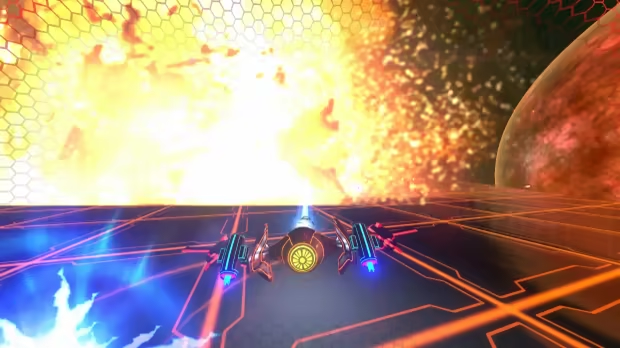
Synthwave Retro-Future Aesthetic!
Neon beats pulsate against an arcade-style grid in what is a fresh twist on a classic formula. Just make sure to keep a cool head with your eyes on the prize.
Upgrades and Renegades…
Selected for your perfect joystick scores, you’re the last hope humanity has of competing in the stars. As an elite starfighter now, you need to upgrade your ships with orbs and parts collected from the battlegrounds.
Puzzles and Ship Drops!
As the level layouts become increasingly more challenging, you’ll be pushed to the limit blasting your way out of the enemy filled space labyrinths.
Join the fight today starfighter!
Loading player reviews…
| Name | Image |
|---|
This product currently supports the following languages:
Windows

Steam key activation & download guide
Follow these steps if you purchased a Steam Key. Steam Gifts use the separate gift-redemption instructions.
Get Steam ready
You will need the Steam desktop client installed on your computer. If it is already installed, simply open it. Otherwise, install Steam before continuing with the activation steps below.
Sign in to your Steam account
Open Steam and sign in, or create an account if you do not have one. Check that you are using the account on which you want to activate your purchase.
Open product activation
In the Steam client, choose + Add a Game at the bottom-left, then Activate a Product on Steam. Follow the on-screen prompts.
Enter your Steam key
Copy the product key supplied with your purchase into the activation field and continue through the confirmation. Use the product key, not your order number.
Download and play
Open your Steam Library, select the activated game and choose Install. Follow the download and installation prompts, then launch the game from your Library.
Having trouble activating your key? Check that you copied the full product key and entered it in Activate a Product on Steam, not the wallet-code field. If you still need help, contact our support team with your order number and the error message shown. Keep your product key private.
· Publisher: Hound Picked Games