




SuchArt: Genius Artist Simulator (PC) Steam Download
Runs on Windows
 Runs on Windows
Runs on MAC
Runs on Linux
Steam Deck compatibility
Compatibility details are loading.
Reported by Steam. Cached for up to 24 hours.
Play on XBOX 360
Play on Wii U
Play on XBOX ONE
Play on Series X|S
Play on PS3
Play on PS4
HTC Vive Support
Oculus Rift Support
Windows Mixed Reality Support
Steam Deck compatibility
Compatibility details are loading.
Reported by Steam. Cached for up to 24 hours.
Released
Developed by
Published by HypeTrain Digital
Runs on Windows  Single Player
 Controller Support
 Achievements
 Steam Trading Cards
 Adventure
 Family Friendly
 Simulation
 Design and Illustration
 Download
gamers playing right now

£19.99
Save 92%
Our Price: £1.50
- Description
- Track Listing
- Media
- Reviews
- Trading Cards
- Achievements
- Languages
- System Requirements
- How Do I Download?

In SuchArt you are a genius artist living in the year 2130. Make the best of the space studio you own. Create art with a large variety of tools, sell your works, get famous and upgrade your studio! Let your imagination run wild and create the art of your dreams!
Features
PAINT EVERYWHERE
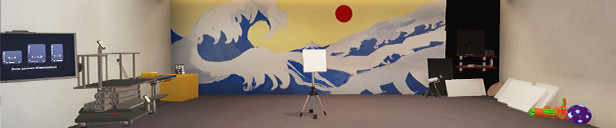
Turn the world around you into a huge canvas and do whatever you please with it — add some red to that gloomy wall, spill paint on the floor and call it abstract expressionism, or start a collection of alphabet paintings from A to Z: this place is yours after all! Wait, how did you mess up your studio that much that fast?
UPGRADE AND DESIGN YOUR STUDIO

Not satisfied with the initial look and/or functionality of your studio? That’s okay, because you can always unlock new rooms, buy some furniture and decorations, and place those however and wherever you want — make yourself at home! Wait, what do you mean you don’t have enough money?!
SELL AND EXPOSE YOUR ART

Sell your paintings at the marketplace, fulfill all your clients' orders, and receive a generous reward, or maybe a gift! Or maybe some exposure, the best of all currencies out there. Don't forget that you can exhibit your amazing art and see what critics have to say about it.
REALISTIC PAINTING

Painting in SuchArt feels just like in real life, but without the downsides. The colors mix as you would naturally expect them to, so you can easily achieve the result you dreamed about. The paint has realistic texture, and each instrument alters it a bit with different strokes. There’s plenty of instruments to choose from: brushes, palette knives, stencils or even flamethrowers to create your next masterpiece.
PICK YOUR SIDE

They say down on Earth the robots are revolting and the Crabuxes covet the planet’s saltwater. But surely that’s none of your business. Or, is it?
Loading player reviews…
| Name | Image |
|---|
This product currently supports the following languages:
Windows

Steam key activation & download guide
Follow these steps if you purchased a Steam Key. Steam Gifts use the separate gift-redemption instructions.
Get Steam ready
You will need the Steam desktop client installed on your computer. If it is already installed, simply open it. Otherwise, install Steam before continuing with the activation steps below.
Sign in to your Steam account
Open Steam and sign in, or create an account if you do not have one. Check that you are using the account on which you want to activate your purchase.
Open product activation
In the Steam client, choose + Add a Game at the bottom-left, then Activate a Product on Steam. Follow the on-screen prompts.
Enter your Steam key
Copy the product key supplied with your purchase into the activation field and continue through the confirmation. Use the product key, not your order number.
Download and play
Open your Steam Library, select the activated game and choose Install. Follow the download and installation prompts, then launch the game from your Library.
Having trouble activating your key? Check that you copied the full product key and entered it in Activate a Product on Steam, not the wallet-code field. If you still need help, contact our support team with your order number and the error message shown. Keep your product key private.
· Publisher: HypeTrain Digital
