




SurrounDead (PC) Steam Download
Runs on Windows
 Runs on Windows
Runs on MAC
Runs on Linux
Steam Deck compatibility
Compatibility details are loading.
Reported by Steam. Cached for up to 24 hours.
Play on XBOX 360
Play on Wii U
Play on XBOX ONE
Play on Series X|S
Play on PS3
Play on PS4
HTC Vive Support
Oculus Rift Support
Windows Mixed Reality Support
Steam Deck compatibility
Compatibility details are loading.
Reported by Steam. Cached for up to 24 hours.
Released
Developed by
Published by PlaySurrounDead
Runs on Windows  Single Player
 Achievements
 Steam Trading Cards
 Action
 Adventure
 RPG
 Shooter
 Download
gamers playing right now

£9.99
Save 30%
Our Price: £6.95


- Description
- Track Listing
- Media
- Reviews
- Trading Cards
- Achievements
- Languages
- System Requirements
- How Do I Download?

5 years have passed since civilization fought against the virus, but nothing has changed. The world lays in pieces, with no one to lead us to a brighter future fighting back against the zombies, people have fallen back to a dark life style.
With few remnants of civilization left, you are left to your own devices to survive in an unforgiving landscape.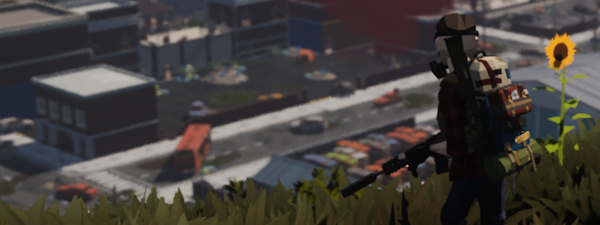
Current Features:
- Open World Zombie Survival Game for many to explore and survive.
- Travel through a devastated post apocalyptic landscape.
- Fight zombies, human survivors and more.
- Vehicles that you need to manage and maintain. Also to use as portable storage.
- Find many different firearms, melee weapons, clothing and different types of equipment.
- Trade with survivors in trader hideouts or safe zones to get that one piece of equipment you need.
- Barricade buildings or find your self somewhere in the wilderness to escape to.
- Weather and day/night cycles, be careful.
- From doing current activities, improve your ability to do them and unlock new abilities in the skill tree.
- Ability to customise the game's difficulty and mechanics.
Planned Features:
- Online multiplayer survival with player run servers.
- Quest and bounty system.
- Story system linking into the quests. Find out more about The Valley.
- Vehicle customisation.
- Farming system.
- More maps and traversal system.
- And more. Stay Tuned.

Loading player reviews…
| Name | Image |
|---|
This product currently supports the following languages:
Windows

Steam key activation & download guide
Follow these steps if you purchased a Steam Key. Steam Gifts use the separate gift-redemption instructions.
Get Steam ready
You will need the Steam desktop client installed on your computer. If it is already installed, simply open it. Otherwise, install Steam before continuing with the activation steps below.
Sign in to your Steam account
Open Steam and sign in, or create an account if you do not have one. Check that you are using the account on which you want to activate your purchase.
Open product activation
In the Steam client, choose + Add a Game at the bottom-left, then Activate a Product on Steam. Follow the on-screen prompts.
Enter your Steam key
Copy the product key supplied with your purchase into the activation field and continue through the confirmation. Use the product key, not your order number.
Download and play
Open your Steam Library, select the activated game and choose Install. Follow the download and installation prompts, then launch the game from your Library.
Having trouble activating your key? Check that you copied the full product key and entered it in Activate a Product on Steam, not the wallet-code field. If you still need help, contact our support team with your order number and the error message shown. Keep your product key private.
· Publisher: PlaySurrounDead